Common FAQ
Preparation:
1.Identify the current BIOS version (e.g.FN41S015) and make sure you have the next version (or desired version) (e.g.FN41S018)
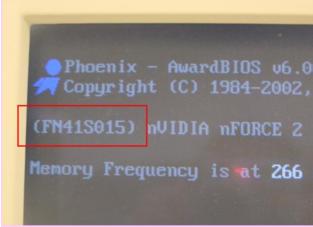
1.Identify the current BIOS version (e.g.FN41S015) and make sure you have the next version (or desired version) (e.g.FN41S018)
Fig. 1: BIOS version location in POST screen
2. Get Winflash from Mainboard CD or download it from http://global.shuttle.com/download/downloadUtilities
3. Download BIOS (e.g. fn41s018.bin) from
http://global.shuttle.com/download
4. Unzip the winflash.zip file and execute setup.exe to install.
Procedures
1. Open WinFlash.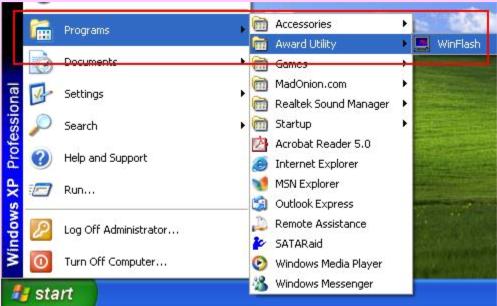
2. Get Winflash from Mainboard CD or download it from http://global.shuttle.com/download/downloadUtilities
3. Download BIOS (e.g. fn41s018.bin) from
http://global.shuttle.com/download
4. Unzip the winflash.zip file and execute setup.exe to install.
Procedures
1. Open WinFlash.
Fig. 2: Location of the WinFlash utility
The beginning screen of the WinFlash (2 different screen are available.)
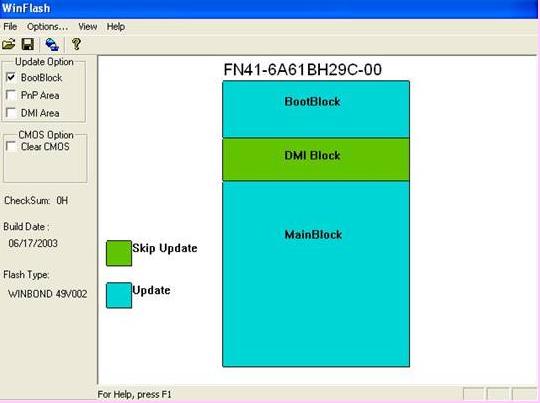
The beginning screen of the WinFlash (2 different screen are available.)
Fig. 3: First screen of the WinFlash(1)
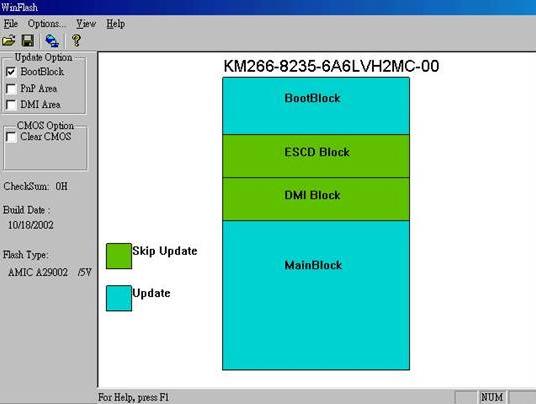
Fig. 4: First screen of the WinFlash(2)
2.Select Update Option: “DMI Area” and “Clear CMOS”
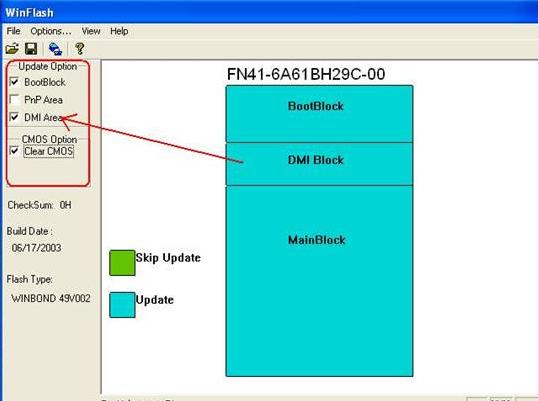
2.Select Update Option: “DMI Area” and “Clear CMOS”
Fig. 5: All selected options will change from green to blue
The “PnP Area” option will be available if there is “ESCD block”
This is not required for updating the BIOS. Ps. ESCD: Extended System Configuration Data
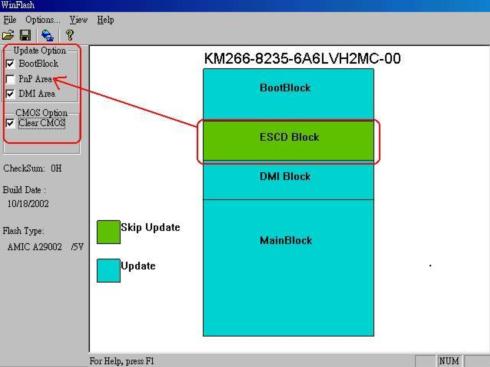
The “PnP Area” option will be available if there is “ESCD block”
This is not required for updating the BIOS. Ps. ESCD: Extended System Configuration Data
Fig. 6: ESCD available for some models. Again, this is not required.
3.Update/Flash BIOS
3.1 Select file: File & Open. Or Click Open icon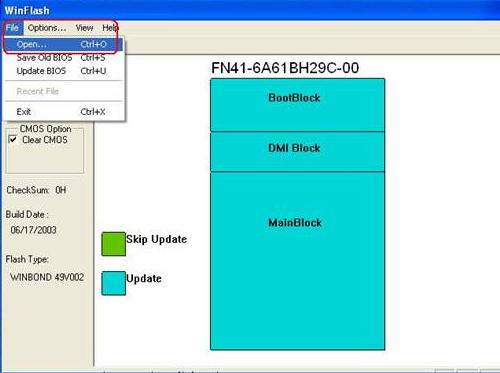
3.Update/Flash BIOS
3.1 Select file: File & Open. Or Click Open icon
Fig. 7: 1st step in flashing/updating BIOS
Load the BIOS file you stored, select the BIOS name and then click Open.
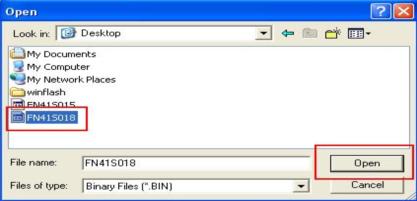
Load the BIOS file you stored, select the BIOS name and then click Open.
Fig. 8: Location of BIOS file
3.2 Execute the file: Select File & Update BIOS or click on the ”Update BIOS now” icon to execute the update.
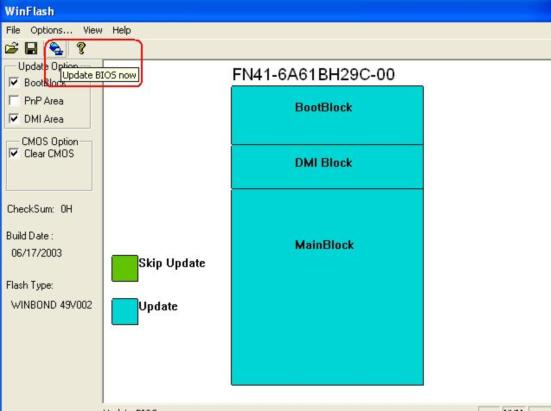
3.2 Execute the file: Select File & Update BIOS or click on the ”Update BIOS now” icon to execute the update.
Fig. 9: Location of BIOS update icon
4.Select ”Update” button to start updating BIOS 。
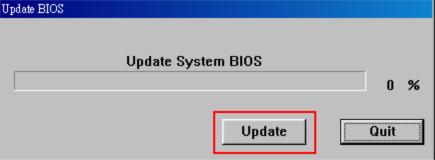
4.Select ”Update” button to start updating BIOS 。
Fig. 10: Final message in updating BIOS
5. After BIOS has been updated, a REBOOT Message will show. Click “Yes” to continue.
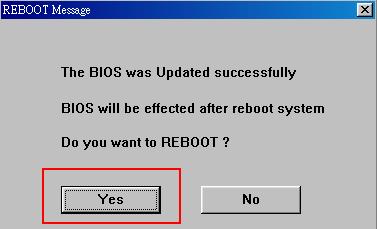
5. After BIOS has been updated, a REBOOT Message will show. Click “Yes” to continue.
Fig. 11: Reboot Message
Rebooting initializes new changes. Take note of the new BIOS number on the first page of the POST screen.
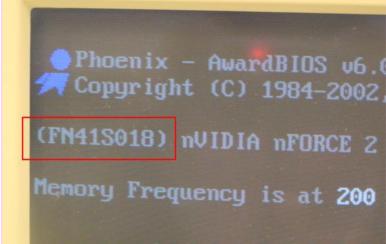
Rebooting initializes new changes. Take note of the new BIOS number on the first page of the POST screen.
Fig. 12: Location of new the BIOS name.
Finally, when the update is complete, restart and enter CMOS Setup Utility (hold down delete at start up). Select “Load Optimized Defaults”, then “Save & Exit Setup”.
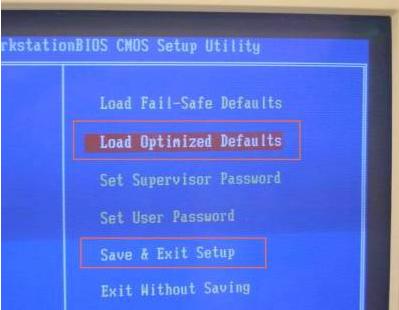
Finally, when the update is complete, restart and enter CMOS Setup Utility (hold down delete at start up). Select “Load Optimized Defaults”, then “Save & Exit Setup”.
Service Center Info
Hot Line : 886-2-8792-6168Hours : Monday through Friday 09:00 to 12:00
13:00 to 18:00 Taiwan Time (GMT+8)
E-mail : Tech Support Form
